
What’s new in StyleShift 2.0.3 / Now available

Your fonts.
Your kind of web.

A little change in type. A whole new feeling.
Pair the fonts you love and shape your favorite websites with your own CSS.

Free & open source Version 2.0.3

DESIGNED FOR THE WAY YOU READ
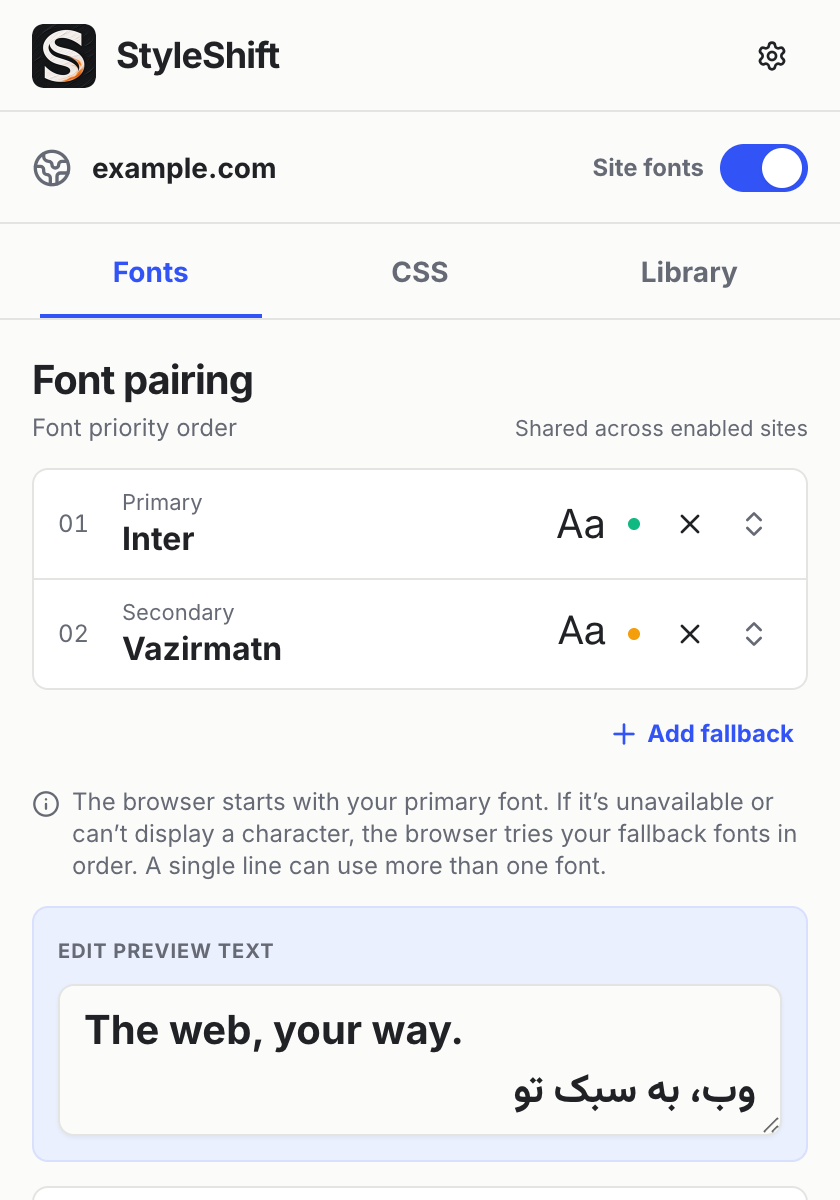
StyleShift 2.0.3 Fonts tab with Inter, Vazirmatn, and an editable preview showing English and Persian textStyleShift 2.0.3 Fonts tab in dark mode with Inter, Vazirmatn, and an editable preview showing English and Persian text
One ordered stack.
Every enabled site.
StyleShift 2.0.3 Fonts tab with sample settings.

Made for the everyday web.

Font pairingCustom CSSPer-site controlLocal by design

01 / A BETTER PAIRING

Different scripts.
One beautiful page.

Keep your favorite primary font. Add a secondary font for the characters it doesn’t have. The browser works through your stack, one missing glyph at a time.

Fonts follow fallback order; they aren’t assigned by language. Add more fallbacks whenever you need them.

Try a reading sampleWebsite demo
01PrimaryInter
02Secondary / fallbackVazirmatn

The web, your way.

Inter + Vazirmatn + system fallback

StyleShift’s interface supports 11 languages, with right-to-left layouts for Arabic and Persian. You can use Vazirmatn as a local or uploaded font. In this demo, other scripts use an available system fallback.

02 / FINER DETAILS, LESS FRICTION

Make yourself comfortable.

The right type is just the beginning.
Here’s what’s inside the 2.0 experience.

A few lines. A personal touch.

Write CSS for one site or all your sites. Autocomplete, diagnostics, formatting and a full editor help you get it right. Site and global styles follow the normal CSS cascade.

reading-room.css EXAMPLE
article {
  max-width: 68ch;
  line-height: 1.8;
  margin-inline: auto;
}

Give your words some room.

Adjust line height, letter spacing and weight. Choose a separate monospace font for code. Use Chrome’s browser-wide, enlarge-only minimum font size for smaller text.

Your sites. Your switches.

One shared font stack, independent font and CSS switches per site. Manage subdomains and start quickly with 27 site shortcuts.

Bring your own type.

Six bundled fonts, locally installed family names, and your own WOFF2, WOFF, TTF or OTF files. Reorder fallbacks by drag or keyboard, with font status indicators.

Settle in. Take it with you.

Export and import your setup with backup controls. Choose light, dark or system appearance. Toggle site fonts with Alt + Shift + S.

03 / LOCAL BY DESIGN

Your browser.
Your business.

StyleShift keeps its settings and uploaded fonts on your device. Its own fonts, icons and interface assets are local, with no built-in telemetry or remote font service.

Read the privacy policy

No account to create
Install it, pick your fonts, make it yours.

Open to inspection
Free and open source under the MIT license.

Your CSS stays your choice
User-authored CSS can reference external URLs and make network requests.

04 / CHANGELOG

A fresh chapter.

What’s new in 2.0.
And how we got here.

Follow on GitHub

2.0.3

Latest release

Eleven interface languages and an editable font preview.

Available on the Chrome Web Store.

  • Six new languages. French, German, Brazilian Portuguese, Traditional Chinese (Taiwan), Japanese and Korean bring the interface and store listing to 11 languages. Existing translations were also reviewed.
  • Follows Chrome’s language. StyleShift uses Chrome’s display language when supported, falls back to English, and remembers your choice in Settings.
  • Try your own text. Type or paste a sample in the preview to see how your font pairing and typography settings look.
  • Cleaner options page. Narrow screens have less space below the navigation, and search fields are easier to spot.

2.0.0

2.0 launch

A more thoughtful way to make the web yours.

Published . Introduced ordered font pairing, a redesigned workspace, and finer control over your everyday reading.

  • A new visual foundation. Inter typography, white and graphite surfaces, cobalt controls, approved brand artwork, and refined light/dark layouts.
  • Ordered font pairing. Primary, secondary and extra fallbacks shared across enabled sites, separate code font, status indicators, and drag or keyboard reordering.
  • A clearer workspace. Fonts, CSS and Library tabs, with a dedicated management page for sites, global CSS, fonts and preferences.
  • More deliberate CSS editing. Separate site/global drafts retained across tabs while the popup stays open; explicit saves, feedback, and full-editor access.
  • Better everyday details. Font-file validation, backup compatibility, refined site controls and corrected right-to-left preview alignment across the five-language interface.
1.2.0Previous release

Dark mode and more control over everyday reading.

  • Light, dark and system themes; line height, letter spacing, font weight and minimum font size.
  • Subdomain inheritance with per-site opt-out, a site manager, and settings export/import.
  • Global CSS, a font-toggle shortcut, bundled site icons and JetBrains Mono in the CSS editor.
  • Fixes for stale-tab CSS injection and domain boundary cases.
1.1.0The editor update
  • Replaced the plain textarea with a CodeMirror CSS editor.
  • Removed the Google Fonts API dependency.
1.0.0The first release
  • Per-site fonts and custom CSS, bundled and Google Fonts support, five interface languages with RTL layouts, auto-enable for all sites, and the original Fabric design.

A web that feels like you.

Make yourself at home with StyleShift 2.0.

Add StyleShift to Chrome

Free & open source. Version 2.0.3.